Quick answer: Copilot Chat handles one-at-a-time questions and drafts. Copilot Cowork, generally available since June 16, 2026, takes on longer, multi-step tasks across apps and is billed through usage-based Copilot Credits. The Work IQ button controls whether Copilot grounds its answers in your organization’s data, your web data, or both, and it’s the visible entry point into a broader Microsoft IQ context layer (Work IQ, Fabric IQ, Foundry IQ, Web IQ) that also powers agents built in Copilot Studio and Microsoft Foundry.
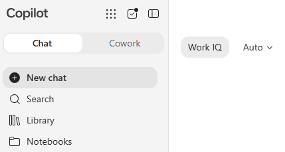
What most people actually see when they open Copilot today.
Open Microsoft 365 Copilot right now and this is roughly what greets you: two tabs at the top, Chat and Cowork. Most people click into Chat, ask a question, and never look at the rest of it. That’s a reasonable place to start, but it also means most people are using a fraction of what’s actually available. This piece walks through exactly what’s in front of you, left to right: what Chat is for versus Cowork, what that Work IQ button is actually doing, and where it fits into a bigger family of Microsoft “IQ” layers you’ll hear about even though you’ll only ever click one of them. Then it covers what’s coming next, and where to go if your business wants to build something of its own.
What’s the difference between Copilot Chat and Copilot Cowork?
Copilot Chat handles single-turn requests; Copilot Cowork handles longer, multi-step tasks across apps without you initiating each step. Chat is the tab most people know: you ask a question or give an instruction, and Copilot responds in that one exchange. It’s built for the kind of back-and-forth you’d have with a very capable assistant sitting next to you: draft this email, summarize that document, help me think through this.
Cowork sits right next to it and does something different. Instead of a single exchange, you hand off a task and Cowork works through it on its own, often across several apps at once, pulling context from SharePoint, email, and your connected systems as it goes. It reached general availability on June 16, 2026, and it’s billed separately from a standard Copilot license: usage is metered through Copilot Credits rather than a flat per-seat cost, so what you spend tracks how much agentic work you actually hand off.
In practice, the difference is about how much you want to stay in the loop. Ask a one-off question or need a draft right now, use Chat. Have something with several steps, spanning a few files or apps, that you’d rather hand off entirely, that’s what Cowork is for.
What does the Work IQ button in Copilot actually do?
The Work IQ button controls whether Copilot grounds its answers in your organization’s work data, the public web, or both. Turn it on and Copilot reads your prompt and decides on its own whether to pull from your files and mail, the web, or both, replacing what used to be a manual toggle between “Work” and “Web” mode. Turn it off and you get a general-purpose assistant working only from public information, useful for research or brainstorming that has nothing to do with your organization’s data.
The Auto label next to it is a separate control: the model picker. Auto lets Copilot choose the right model for the task automatically. Click it and you can also choose manually between Quick Response for fast answers, Think Deeper when a question is worth more time, or a specific model outright, depending on what your organization has enabled.
How is Work IQ different from the rest of the Microsoft IQ family?
Work IQ is the one button you click; the rest of the Microsoft IQ family is the infrastructure working behind it. Work IQ is the most visible member of a larger family Microsoft calls Microsoft IQ, a shared layer of business context available to more than just Copilot Chat. Fabric IQ does for structured business data, your reports, your OneLake and Power BI content, what Work IQ does for documents and email. Foundry IQ ties enterprise knowledge sources together behind a single retrieval layer for agents built on Microsoft Foundry. Web IQ extends that same grounding out to live information on the open web. None of these show up as a button you click. They’re the same reason an agent built in Copilot Studio or GitHub Copilot can draw on the same trusted context instead of every tool rebuilding its own connection to your data.
What is Microsoft Scout?
Microsoft Scout is Microsoft’s first “Autopilot”: an always-on agent that works in the background across Teams, Outlook, OneDrive, SharePoint, and your calendar without waiting to be asked. Cowork still waits for you to hand it a task; Scout goes a step further. It was introduced at Microsoft’s Build conference and is currently limited to a small group of customers in Microsoft’s early access Frontier program, so most organizations, including most businesses your size, don’t have it yet. It’s worth knowing about because it signals where this is headed, not because it’s something to plan around this quarter.
Where should you build a custom Copilot agent?
The right tool depends on scope, not skill level: Agent Builder fits a single team, Copilot Studio fits a department or the whole company, and Microsoft Foundry fits a custom, developer-built solution. Everything above is what Microsoft ships. If a use case doesn’t fit neatly into Chat or Cowork, these are the three places to build something of your own.
Agent Builder: best for a single team
Built directly into Copilot Chat, no code required. Describe what the agent should do and point it at a SharePoint site or another source, and it’s ready in under an hour. Right fit for a bounded, team-owned use case, such as an agent that answers questions from your HR policy documents.
Copilot Studio: best for a department or the whole business
A low-code platform for agents meant to serve a department or the whole organization rather than one team. Hundreds of prebuilt connectors, governance controls managed through the Power Platform admin center. For most businesses your size, this is where an agent should live once it outgrows a single team’s use.
Microsoft Foundry: best for custom, developer-built solutions
Formerly Azure AI Foundry. A full developer environment for custom models and custom orchestration, built for organizations with development resources creating something highly specific. Not a typical need for a business in the 50 to 300 seat range. Notably, Copilot Studio can call a Foundry-hosted model as its backend, so the two aren’t competing options so much as a low-code front end paired with a custom back end when one is actually needed.
Where Decision Systems fits
Most of what actually matters for your business today is already sitting in that sidebar: Chat for quick work, Cowork for handing off multi-step tasks, and the Work IQ button deciding where your answers come from. Scout and the deeper build tools matter more for where things are headed than for what to act on this quarter.
This is exactly the kind of landscape our Design, Integrate, Manage process exists for. Before any of it is worth relying on, we assess whether your Microsoft 365 foundation, your SharePoint structure, data organization, and permissions, is actually ready to ground Work IQ and Cowork in trustworthy information. An agent working from a disorganized SharePoint site produces disorganized answers, no matter how capable the model behind it is.
From there, we help your team get comfortable with what’s already available, and make the call on whether Cowork’s usage-based Credits are worth adopting now or worth watching a bit longer. If you’re not sure where your business actually stands with any of this, that’s a conversation worth having before you invest further.
Frequently asked questions
Is Copilot Cowork included in my existing Microsoft 365 Copilot license?
No. Cowork is metered separately through usage-based Copilot Credits rather than included in the flat per-seat Copilot license, so cost scales with how much agentic work you actually run.
Do I need Microsoft Scout to use Copilot Cowork?
No. Cowork is generally available today to licensed Copilot customers. Scout is a separate, further-out capability still limited to Microsoft’s Frontier early access program.
Can a Copilot Studio agent use a model hosted on Microsoft Foundry?
Yes. Copilot Studio can call a Foundry-hosted model as its backend, which is why the two are better understood as a low-code front end paired with an optional custom back end rather than competing products.
What happens if I turn the Work IQ button off?
Copilot switches to a general-purpose assistant grounded only in public web information, with no access to your organization’s files, email, or other work data.
Is Work IQ available on the free version of Copilot Chat?
No. Work IQ requires a paid Microsoft 365 Copilot license. Free Copilot Chat users won’t see the Work IQ button at all.
Sources
Microsoft 365 Copilot release notes (Work IQ button) — https://learn.microsoft.com/en-us/microsoft-365/copilot/release-notes
Frequently asked questions about Microsoft Copilot Chat — https://support.microsoft.com/en-us/microsoft-365-copilot/frequently-asked-questions-about-microsoft-365-copilot-chat
Microsoft 365 Copilot product page (Cowork, Work IQ) — https://www.microsoft.com/en-us/microsoft-365-copilot